RegattaLog

Main navigation

  • Course Maker Guide
  • Course Maker
  • Home
User account menu
  • Log in

Breadcrumb

  1. Home
  2. Course Maker User Guide
  3. Create a Regatta
  4. Adding and Editing Courses

Obstructions and Restrictions

Optionally, you can insert points that will be treated as restrictions. For example a course whose straight line runs over land can be diverted around a point of land.

Select (or create, discussed below) the point that affects a course leg. For example: South Tower Golden Gate Bridge. Since it's saved as a mark of type "Land/Obstruction" you now get two new "side" options:

  • obs-lv-port: Leave this obstruction to Port
  • obs-lv-strbd: Leave this obstruction to Starboard

The mark will not be listed in the course definitions, but if the selected mark intrudes on the leg of the course, the display will show an offset in the leg. Where weather calculations are made, the slight (or significant) change in course angles will be taken into account.
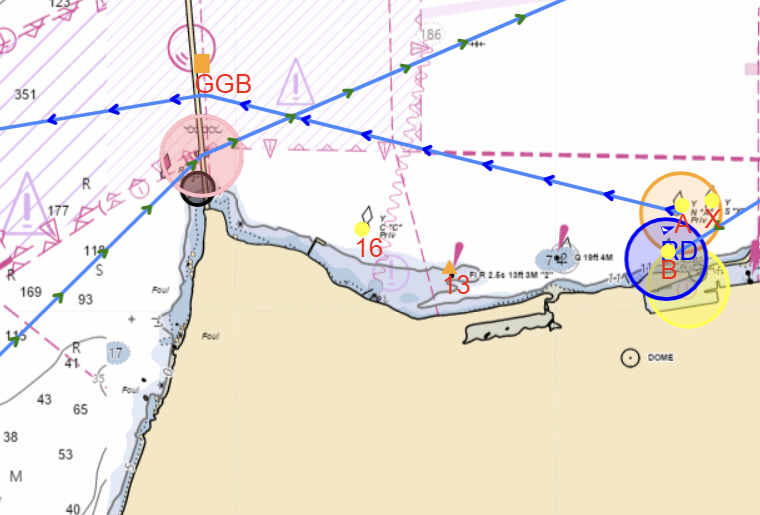
Chart
The courses into and out of the gate are offset by the South Tower of the Golden Gate Bridge

Book traversal links for Course Maker User Guide

  • Offset and Weather Dropped Marks
  • Up
  • Creating New Marks

Contents

  • Course Maker
  • Getting Started
  • Create a Regatta
    • Adding and Editing Courses
      • The Chart Display
      • Marks
      • Offset and Weather Dropped Marks
      • Obstructions and Restrictions
      • Spotting Mistakes
    • Lock the Regatta
  • Regatta and Course Analysis
  • Publish
RSS feed
Powered by Drupal